I spent two years managing our lodge with Excel spreadsheets. One for members. One for dues. One for officers. One for meeting attendance.
Every time someone asked a question, I had to open three files, cross-reference data, and hope my formulas still worked.
When I stepped down as Secretary, I handed my successor a folder of spreadsheets with detailed instructions. He called me three times in the first week asking where things were.
That’s when I realized spreadsheets aren’t a system. They’re a personal workaround that dies with your term.
Here’s what I learned switching to actual lodge management software.
Freemasons Community: Join thousands of Masons from around the world in a private, active community built for the Craft.
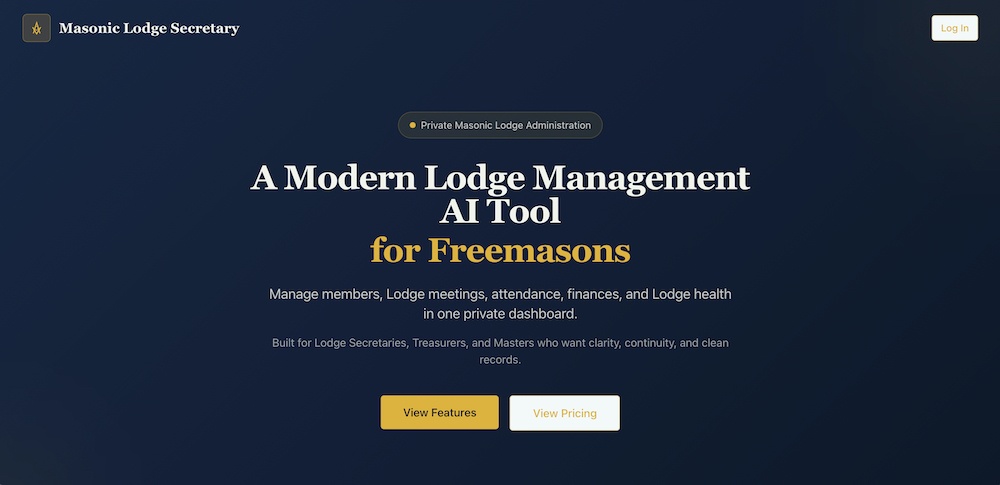
Masonic Lodge Secretary: Stop drowning in paperwork. Manage your entire Lodge from one simple, purpose-built tool.
MasonicFind Newsletter: The weekly read for serious Masons. Insights, ideas and resources delivered straight to your inbox.
The Member Management Problem
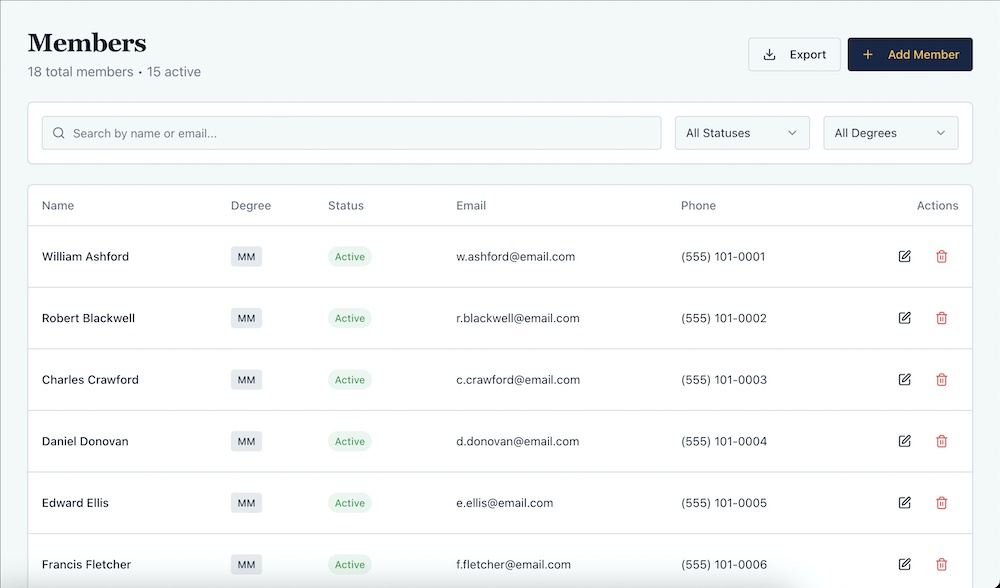
With spreadsheets, I had a member roster with columns for name, email, phone, address, degree, status, and key dates. Basic stuff.
Worked fine until I needed to filter it multiple ways. Show me all Master Masons. Now show me everyone who hasn’t paid dues. Now show me members initiated in the last two years who are currently serving as officers.
Each question required manual sorting, filtering, and sometimes creating helper columns. Five minutes minimum per question.
With Masonic Lodge Secretary, the member directory has all that data in one place with instant filtering. Active members, degree level, status, officer positions all visible and searchable.
Click “Master Masons” and you see only Master Masons. Click on a member and you see their complete record: contact info, degree dates, dues status, current officer position, attendance history, all in one view.
The difference isn’t features. It’s that everything’s connected. Update a Brother’s status to “Inactive” and he disappears from active member counts everywhere. Mark him as Treasurer and it shows in both the member list and officer roster.
Spreadsheets can’t do that. You update in one place and hope you remember to update everywhere else.
Tracking Officers Across Terms
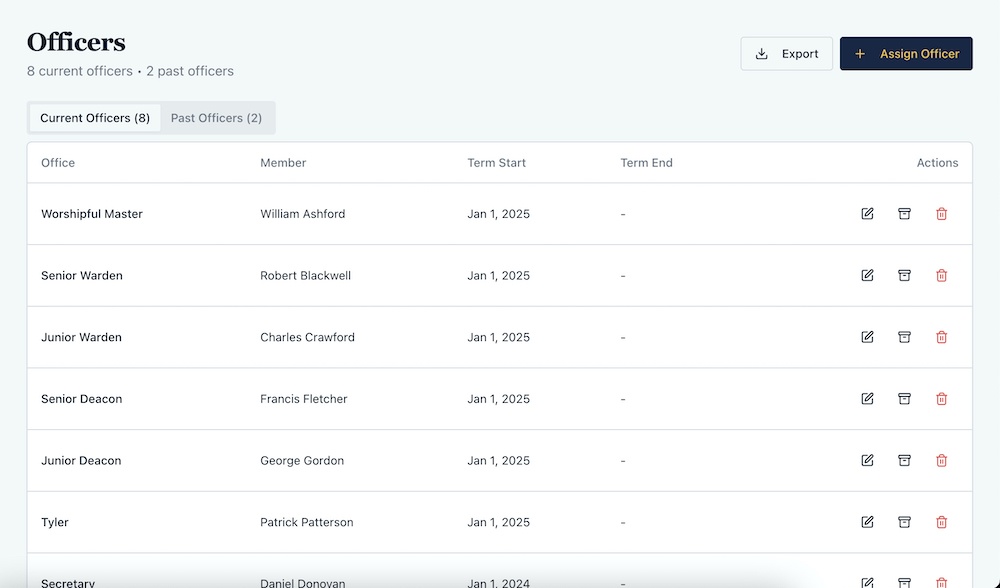
My officer spreadsheet had columns for position, member name, and term start date. Simple.
The problem? Historical tracking.
When did Brother Smith serve as Senior Warden?
Who was Treasurer in 2019?
How many terms has Brother Jones served?
I didn’t track that. Each year I just updated the spreadsheet. Previous years were gone unless I saved copies, which I sometimes forgot.
Masonic Lodge Secretary has a dedicated officer management system with current and past officers. You see all twelve standard positions plus any custom positions you add.
Assign someone to a position and it records the term start date automatically. When they step down or get reassigned, it archives their term with start and end dates.
Need to know who served as Junior Warden three years ago? Check the past officers tab. Everything’s preserved automatically.
The system also shows members holding multiple positions, which happened more than I’d like to admit. Our Chaplain was also our Marshal one year.
The spreadsheet didn’t flag that. The software does.
Dues Collection Without the Chaos
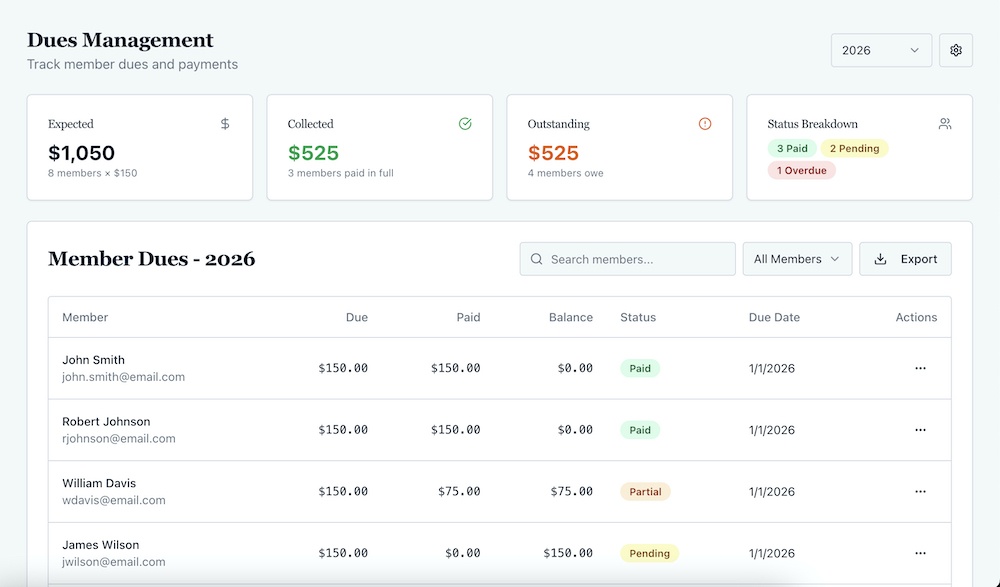
Dues tracking nearly broke me. Separate spreadsheet with member names, amount due, payment status, payment date, payment method.
Every year, I’d copy the spreadsheet, update the year, reset all the statuses, and start over. Sometimes I’d forget to add new members. Sometimes I’d forget to remove members who’d demitted.
When someone paid, I’d mark them paid and note the date and method. When the WM asked for collection rate, I’d count manually.
“We’ve collected from 38 out of 52 members, so 73%.”
Masonic Lodge Secretary generates dues records automatically for every active member when you set the annual amount and due date. You don’t build the list. It builds itself based on your member roster.
Someone pays dues? Record the payment with date, method, and notes. The system generates a receipt, updates the status, and recalculates collection rate automatically.
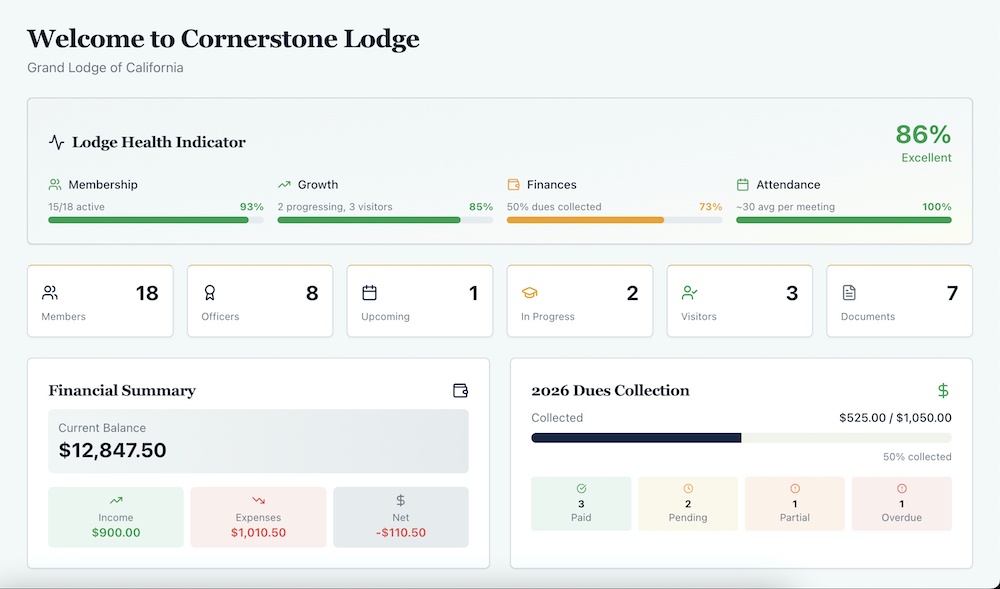
The dashboard shows expected total, collected total, outstanding balance, and status breakdown. Paid, pending, overdue, exempt all visible without counting.
You can set a lodge-wide due date and customize it per member for special cases. You can mark members exempt or waived with reasons noted.
When a new member joins mid-year, he gets added to dues tracking automatically. When someone demits, he’s removed. No manual list maintenance.
The difference is automatic sync. Your member roster and dues tracking stay connected. Spreadsheets can’t do that without complex formulas that break.
Meeting Records That Are Actually Useful
I kept meeting minutes in Word documents. Attendance on paper sign-in sheets that I’d later type into a spreadsheet.
Finding anything required remembering which month something happened. “When did we vote on new aprons?” Let me check March. No, maybe April. Maybe May?
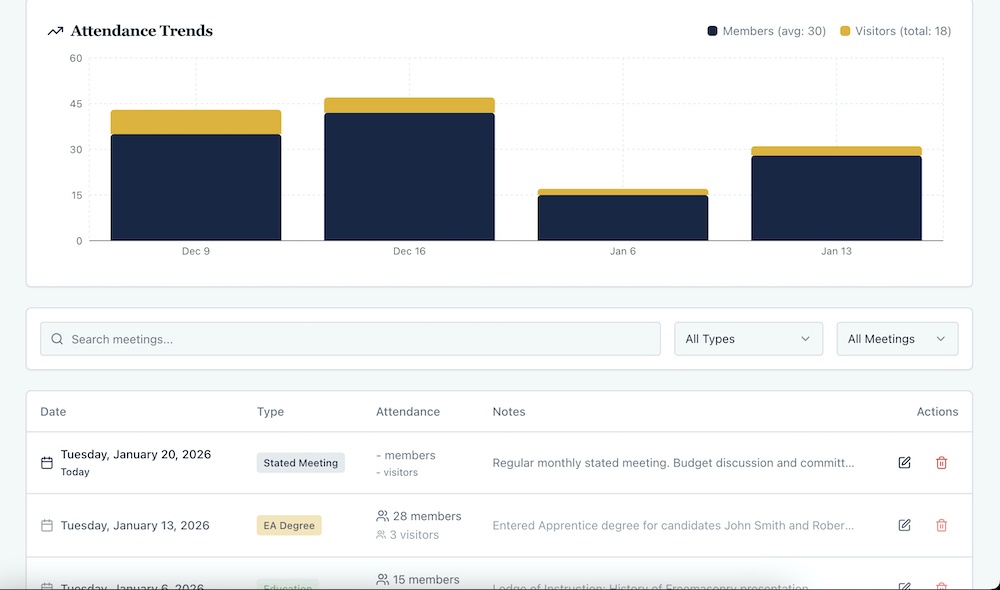
Masonic Lodge Secretary has a meetings page where you schedule upcoming meetings and log past meetings. Each meeting records date, type, attendance counts, and full meeting minutes.
For past meetings, you fill in presiding officer, time opened and closed, degrees conferred, petitions received, bills approved, committee reports, all the standard minute fields.
The attendance chart shows trends over time. You can see if attendance is improving or declining at a glance.
The best feature? Generate PDF minutes with one click. Professional formatted PDF with your lodge info, all meeting details, all minute fields. Opens in a new window ready to print or save.
Those PDFs auto-save to your documents library, so meeting minutes are preserved and searchable forever.
With spreadsheets, I was manually creating minutes in Word, saving them somewhere, hoping I’d remember the file name later. Half the time I couldn’t find what I needed.
Candidate Progress Nobody Tracked
I didn’t track degree candidates systematically with spreadsheets. I’d write names on paper, note when they were initiated, and hope I remembered to follow up.
Our Senior Deacon tracked it his way. I tracked it mine. Sometimes our information matched. Sometimes it didn’t.
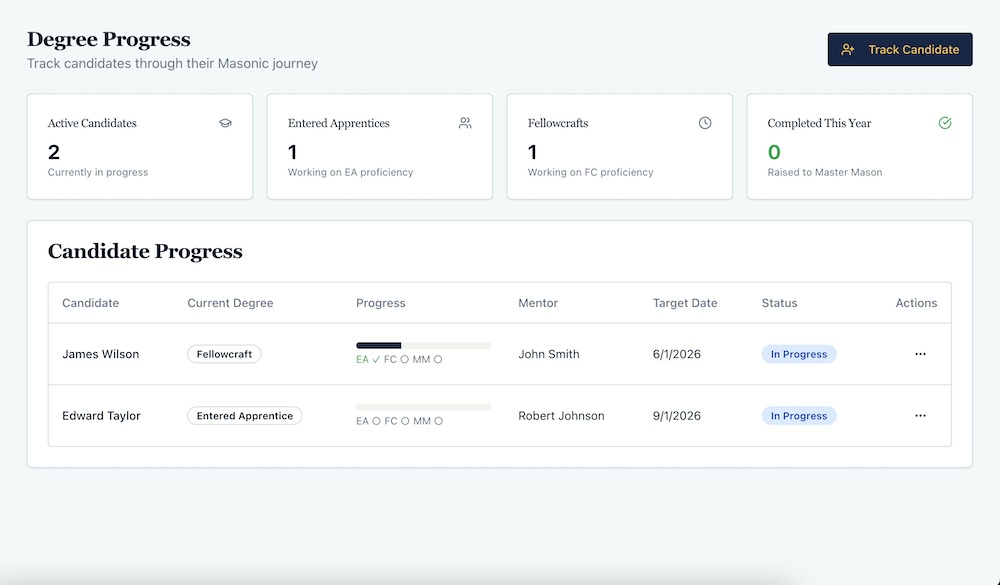
Masonic Lodge Secretary has a dedicated degree progress section. You add a candidate by selecting an existing EA or FC member, or creating a new candidate entirely.
Each candidate shows current degree, visual progress bar, proficiency completion dates, mentor assignment, target completion date, and status.
You can see everyone in progress at once. Who’s on track. Who’s stalled. Who needs follow-up.
The dashboard shows active candidates, how many at each degree, and how many completed this year. Everything visible without hunting through notes.
This isn’t revolutionary. It’s just basic project tracking applied to degree work. But with spreadsheets, I never bothered because it was too much manual work.
Financial Tracking That Projects Forward
My finance spreadsheet had columns for date, description, category, amount, and balance. I’d enter income and expenses, update the balance manually.
When the WM asked “How long until we run out of money?” I had no idea. I could see current balance but projecting required building formulas I never got around to.
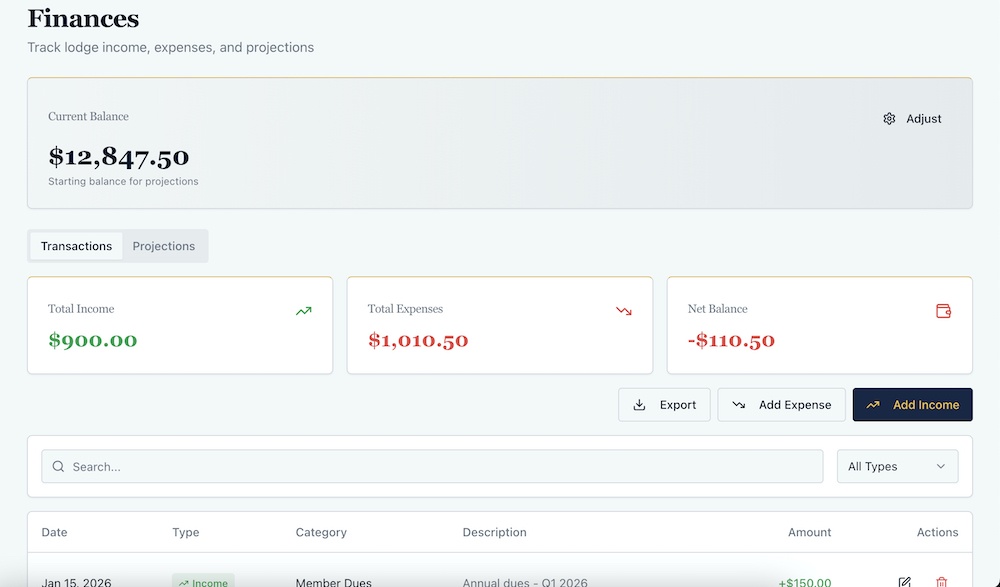
Masonic Lodge Secretary has a finances section with transactions tab and projections tab. Record income and expenses with date, category, and description.
Categories are built in: dues, donations, rentals for income. Utilities, supplies, maintenance, insurance for expenses.
Dues payments automatically appear as income transactions. Everything stays synced.
The projections tab shows twelve-month forecast. It calculates expected dues income based on active members and annual dues amount, breaks it down monthly, and shows running balance projection.
You can see exactly when you’ll run into trouble if nothing changes. Not guessing. Actual math based on your real numbers.
Current balance sits at the top with option to adjust if needed. Total income, expenses, and net balance all visible.
With spreadsheets, I had the raw data but not the analysis. I could tell you what happened. I couldn’t tell you what would happen.
The Visitor Log I Never Kept
I didn’t track visitors in spreadsheets. I noted them in meeting minutes and forgot about them.
Six months later, someone would ask “How many visitors did we have from that lodge in Ohio?” and I’d have no idea.
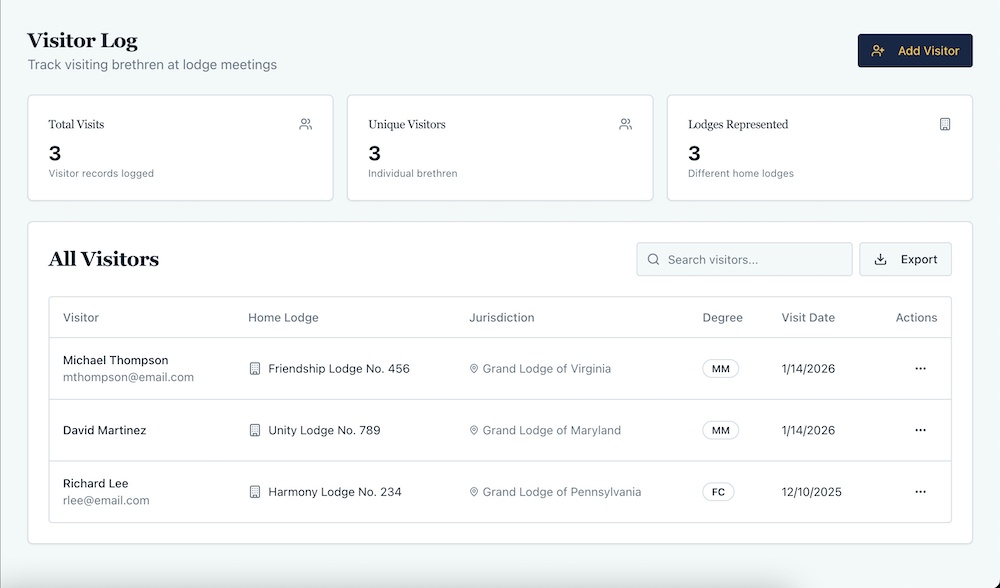
Masonic Lodge Secretary has a dedicated visitor log. Record name, home lodge, number, jurisdiction, degree, visit date, meeting attended.
The dashboard shows total visits, unique visitors, and lodges represented. Search by name, lodge, or jurisdiction.
Link visitors to specific meetings so you know exactly which meeting they attended. Export everything to CSV if Grand Lodge wants a report.
This is simple data entry, but without a dedicated place for it, I just never did it consistently with spreadsheets.
Documents That Don’t Disappear
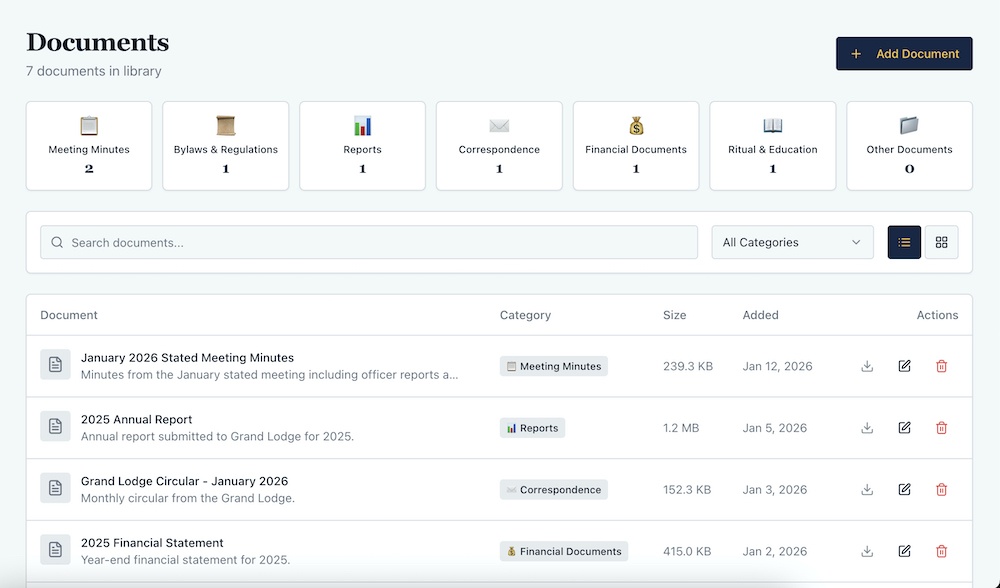
I saved important documents on my computer. Bylaws, forms, old financial reports, meeting minutes.
When I stepped down, I tried to hand them all over. Forgot some. Couldn’t find others. The new Secretary was working with incomplete records.
Masonic Lodge Secretary has a documents library with categories: minutes, financial, bylaws, correspondence, forms, reports, other.
Upload documents with name, category, and description. They’re searchable and accessible to whoever needs them.
Meeting minutes PDFs auto-save here. Everything’s preserved and organized in one place that survives officer transitions.
With spreadsheets and local files, everything’s on someone’s personal computer. When they leave, it might leave too.
What Actually Changes
The shift from spreadsheets to dedicated software isn’t about features. It’s about three things:
- Everything’s connected. Change data once and it updates everywhere. Spreadsheets require manual updates in multiple places.
- Everything’s preserved. Officer transitions don’t lose data. The new Secretary sees what the old Secretary saw.
- Everything’s accessible. Multiple officers can view the same information without asking the Secretary for it.
For our lodge, moving to Masonic Lodge Secretary meant the Junior Warden could check meeting schedules without texting me. The Treasurer could see member counts without asking. The WM could see lodge health metrics without requesting reports.
Spreadsheets work if you’re the only person who needs the data. They fall apart when multiple people need access or when officers change.
The Real Cost Comparison
Spreadsheets are free.
Masonic Lodge Secretary costs $147/year or $347 one-time for lifetime access (if you’re still in tiem for the introductry bonus offer).
But spreadsheets cost time. Time building them. Time maintaining them. Time searching for information. Time explaining them to your successor.
More importantly, spreadsheets cost continuity. Every officer builds their own system. Every transition loses knowledge.
The lifetime option pays for itself in under three years compared to annual. After that, it’s free forever with updates included.
You’re not paying for software. You’re paying for systems that outlast individual officers. For information that doesn’t disappear. For questions that get answered in seconds instead of minutes.
That’s not a cost. That’s infrastructure.
The Transition Takes One Day
I thought switching would be a nightmare. Migrating data. Learning new systems. Rebuilding everything.
Took me about four hours. Import members from CSV. Add officers manually. Enter current financial data. Set up dues.
Everything else built from there. Schedule meetings as they come. Record attendance. Track candidates. Add documents.
The system grows with you. You don’t need everything perfect on day one.
And the next Secretary? He logs in and everything’s already there. No file box. No explanations. Just a working system.
That alone was worth switching.
TrestleLog: Finally, a proper way to log your Masonic journey. Track every meeting, degree and milestone in one place.
Great Masonic Library: Unlock 300+ rare and out-of-print Masonic books that most Masons will never get to read.
MasonicMentor.AI: Get instant answers to your Masonic questions, any time. Like having a wise mentor available 24/7.
Masonic Courses: Go deeper than your Lodge can take you. In-depth courses on history, ritual and philosophy at your own pace.
FreemasonryAI: Save hours every month with 150+ AI prompts built specifically for Lodge officers and Masonic education nights.
Masonic Etiquette: Know exactly how to conduct yourself in Lodge. The guide every Mason wishes they had from day one.
Masonic Lessons: The lessons behind the ritual, explained clearly. Deepen your understanding at every degree.
Lodgeman Bundle: Everything a dedicated Mason needs in one bundle. The best value way to invest in your Masonic education.
Masonic Lectures: Classic lectures that have shaped Freemasonry for generations, ready for you to study and deliver.
The Masonic Way: Freemasonry is more than a meeting. Discover how to live its principles every single day.
100 Facts About Freemasonry: Surprising, fascinating and little-known facts about the Craft. Perfect for Masons and curious minds alike.
Become a Freemason: Thinking about joining? This guide walks you through everything you need to know before you knock on the door.