My first month as Secretary, I got a call at 9 PM on a Tuesday. The Worshipful Master needed to know who attended the last three meetings.
I had no idea. The attendance sheets were somewhere. Maybe in the folder I brought home. Maybe still at the lodge. Maybe in my car.
I told him I’d get back to him. Spent forty minutes digging through papers. Finally found two of the three sheets.
Called him back at 10 PM with partial information and a promise to find the rest later.
That’s when I realized the previous Secretary wasn’t disorganized. The job was impossible to do well with the tools he’d given me.
Three ring binders. Loose papers. Email threads. Spreadsheets saved God knows where. Notes on whatever was handy.
There was no system. Just chaos with a filing cabinet.
Freemasons Community: Join thousands of Masons from around the world in a private, active community built for the Craft.
Masonic Lodge Secretary: Stop drowning in paperwork. Manage your entire Lodge from one simple, purpose-built tool.
MasonicFind Newsletter: The weekly read for serious Masons. Insights, ideas and resources delivered straight to your inbox.
The Core Problem
Here’s what kills most Secretaries: they’re trying to manage fifty different types of information with fifty different tools.
Member roster in one spreadsheet. Officer list in another. Dues tracking in a third.
Meeting minutes in Word documents scattered across folders. Correspondence in email. Visitor logs on paper at the lodge.
Candidate information in the Senior Deacon’s head. Financial summaries from the Treasurer. Grand Lodge requirements in a PDF somewhere.
Every piece of information lives somewhere different. Every question requires checking multiple places. Every task means switching contexts.
You’re not disorganized. You’re trying to organize the unorganizable.
Start With What You Actually Need to Track
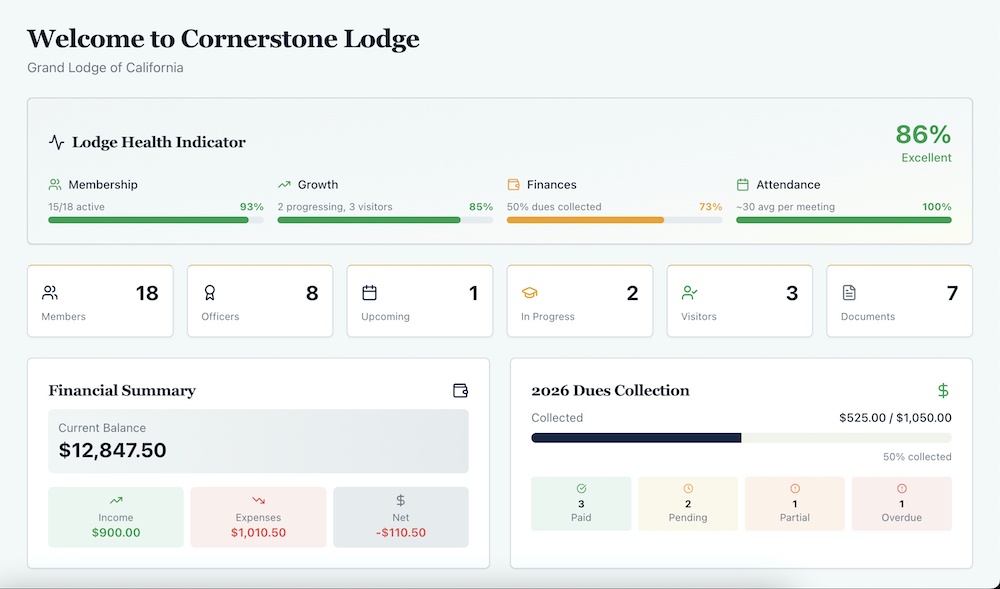
Before you can get organized, you need to know what you’re organizing. Here’s the complete list of what a Secretary actually manages:
Member information: names, contact details, degrees, status, key dates. Officer assignments: who holds what position and when their term started.
Meeting records: dates, types, attendance, minutes, decisions.
Correspondence: incoming and outgoing, both lodge and Grand Lodge.
Candidate progress: where each candidate is in their degree work.
Visitor logs: who visited, from where, when. Dues status: who paid, who didn’t, who’s overdue.
Documents: bylaws, policies, forms, reports.
That’s eight categories. Most Secretaries have this spread across twenty different locations.
The first step to organization isn’t better filing. It’s a consolidation.
The Single Source Principle
Here’s the rule that changed everything for me: every piece of information should live in exactly one place.
Not one place plus a backup. Not one official place and three working copies. One place.
When you need member information, you go to one place. When you need meeting history, one place. When you need to check dues status, one place.
This sounds obvious. Most Secretaries don’t do it.
They have the “official” member list on their computer. But they also have a working copy in email. And a printed version for meetings. And the Treasurer has his own version for dues.
Now there are four versions. Which one is current? Who knows.
Single source means when you update something, it’s updated everywhere. Because there is no “everywhere.” There’s just one place.
Member Records That Actually Work
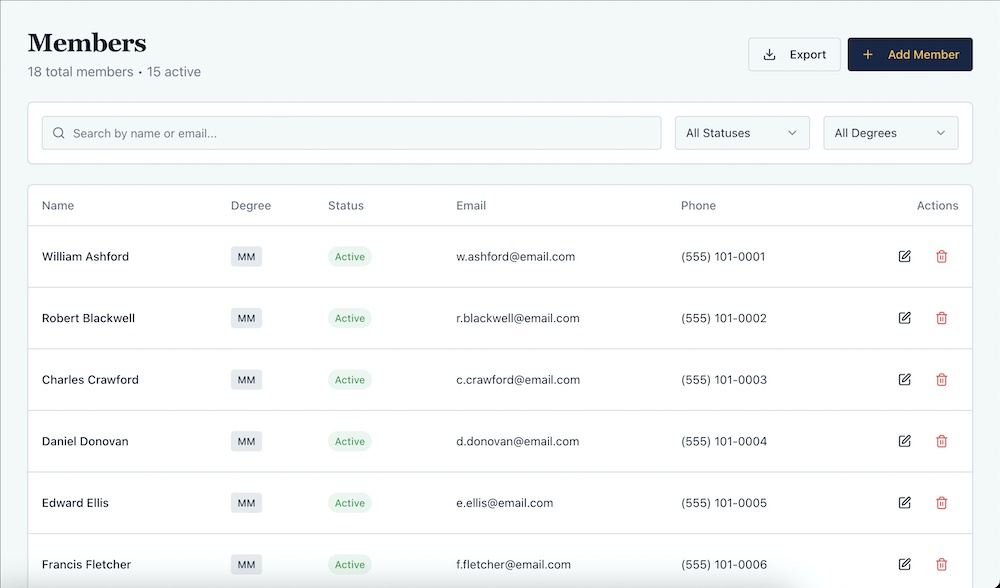
Your member roster is the foundation of everything. Get this wrong and nothing else works.
Here’s what you need for every member: full name, contact information (email, phone, address), current degree, member status, initiation date, passing date, raising date, any officer positions held, dues status.
Most Secretaries have this in a spreadsheet. That works until you need to filter it six different ways.
Show me all Master Masons. Show me everyone who hasn’t paid dues. Show me members who joined in the last five years. Show me who’s currently serving as an officer.
Each question requires manual work. Scrolling, sorting, filtering. Five minutes to answer what should take five seconds.
The member roster needs to be searchable, filterable, and connected to everything else. When Brother Smith gets raised, his degree updates everywhere. When he pays dues, his status updates everywhere. When he becomes Junior Warden, that’s visible everywhere.
One change. One place. Everywhere updated.
Meeting Records You Can Actually Find
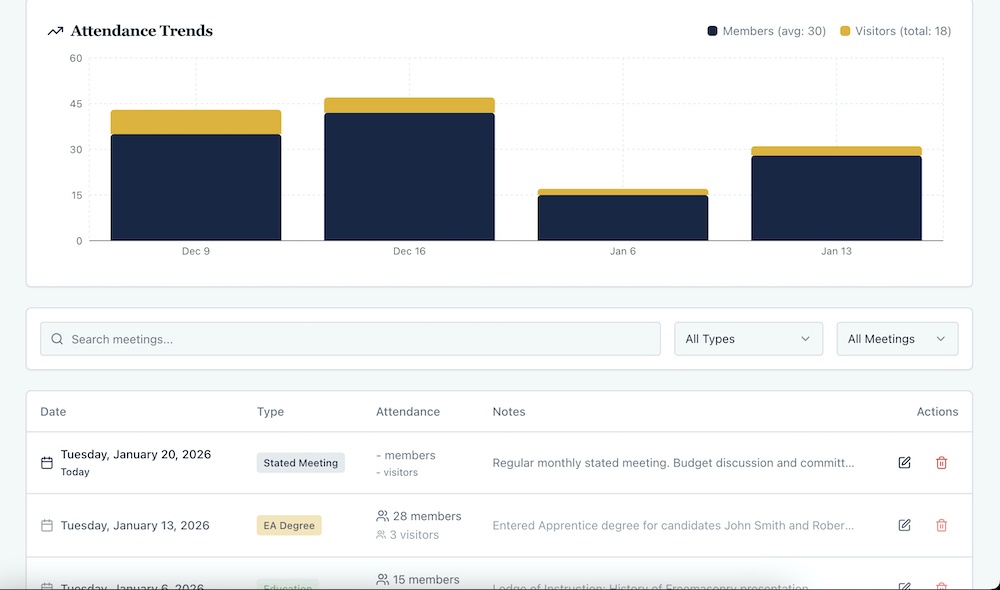
Most Secretaries have meeting minutes filed by date. January 2024, February 2024, March 2024.
That’s fine if you remember when something happened. Useless if you’re trying to find when the lodge voted on a particular motion.
Meeting records need to be searchable. Not just by date, but by content.
When did we last discuss the building fund? Search “building fund.” When did we vote on new aprons? Search “aprons.” When did that Brother from Ohio visit? Search “Ohio.”
Paper files can’t do this. Neither can Word documents unless you remember exactly which one to open.
Your meeting records should also link to attendance.
Not just “32 members present” but which 32 members. So when someone asks “Was Brother Johnson at the February meeting?” you can answer instantly.
Most Secretaries can’t. They know how many people came. They don’t know who unless they saved the sign-in sheet and can find it.
Correspondence That Doesn’t Disappear
You get an email from Grand Lodge. You respond. Six months later, someone asks what you said.
Where’s that email? Buried in your inbox somewhere. Maybe in a sent folder. Maybe deleted.
You get a letter from another lodge. You file it. Three months later, the Worshipful Master asks if you ever responded.
Did you? When? What did you say?
Most Secretaries lose track of correspondence because it’s not centralized. Email here, letters there, some stuff printed and filed, some stuff still digital.
Here’s what works: every piece of correspondence gets recorded in one place with the date, sender, summary, and response status.
Email from Grand Lodge on March 15 about annual returns? Recorded. Response sent March 17. Done.
Letter from visiting lodge on April 3 thanking us for hospitality? Recorded. No response needed.
Now when someone asks “Did we ever hear back from that lodge about the joint meeting?” you can look it up instead of guessing.
Candidate Tracking That Actually Happens
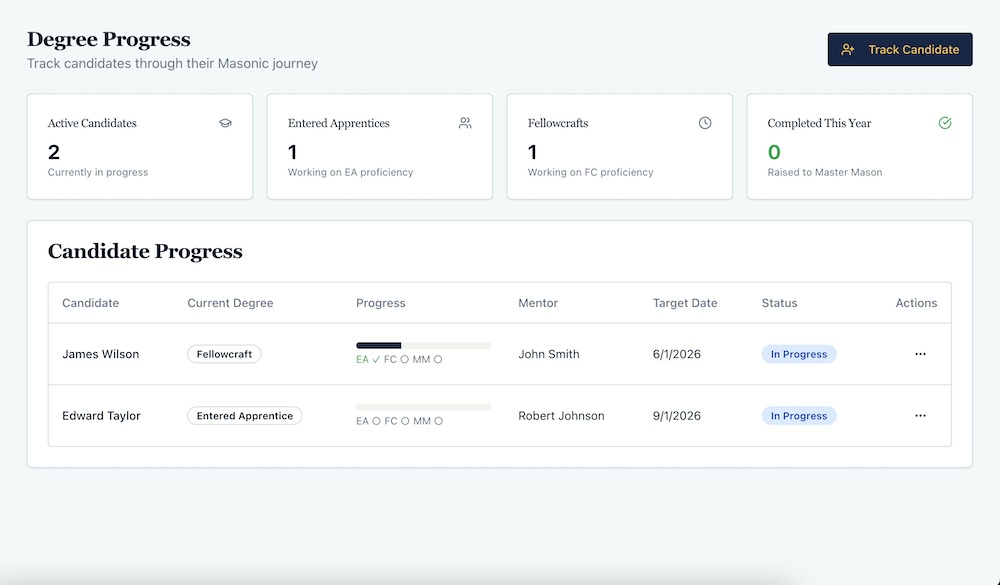
This is where most lodges fail. Not because they don’t care about candidates, but because nobody’s systematically tracking them.
You know you have two Entered Apprentices. You think one of them is working on proficiency. The other one, you’re not sure. When were they initiated? Who are their mentors? When are they supposed to be ready?
All good questions. Most Secretaries can’t answer them without making phone calls.
Here’s what candidate tracking needs: current degree, initiation date, proficiency completion dates, mentor assignment, target completion date, status notes.
This should be visible at all times. Not buried in email. Not in someone’s head. Not on a paper form filed away.
When the Worshipful Master asks “How are our candidates doing?” the answer should take thirty seconds, not thirty minutes.
Our lodge started tracking candidates properly when we moved to Masonic Lodge Secretary. Suddenly we could see everyone in progress, who their mentors were, when they were supposed to be ready.
Turns out we had candidates stalled that nobody knew about. Having visibility meant we could actually help them.
Dues Management Without the Headaches
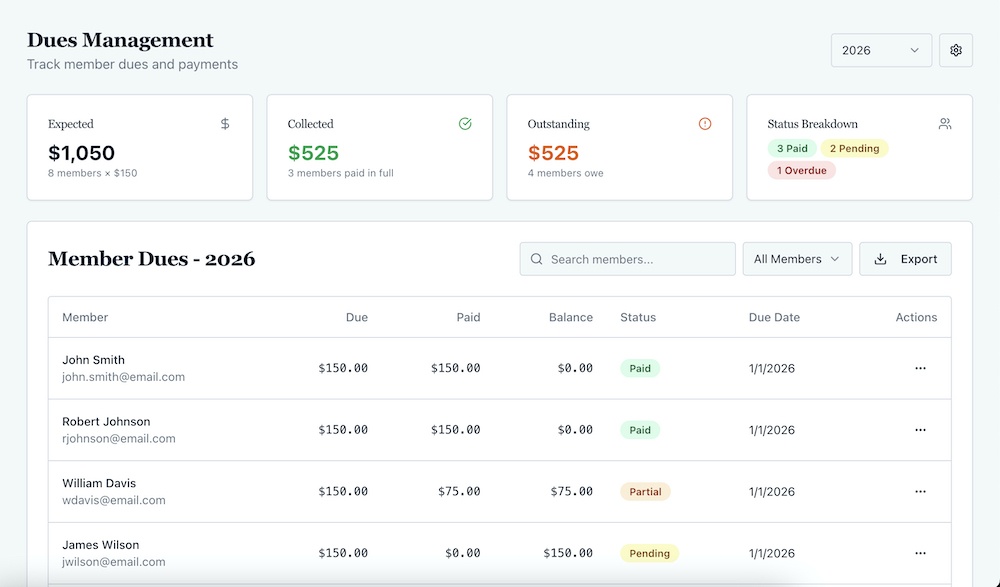
Dues collection should be simple. It’s never simple.
Some guys pay in January. Some pay in March. One guy mails a check. Another pays at a meeting. Someone claims he paid but you can’t find the record.
The Treasurer is tracking payments. You’re tracking who paid. Hopefully those match. They might not.
Here’s what makes dues manageable: one record per member per year showing amount due, payment status, payment date, payment method, any notes.
When someone pays, you record it once. Status updates. Balance updates. Receipt generates. Done.
No separate spreadsheet. No matching records between Secretary and Treasurer. No hunting for who paid three months ago.
The system tracks it. You just record the payment.
The Weekly Review That Saves You
Most Secretaries work reactively. Someone asks a question, you find the answer. Someone needs something, you provide it.
You’re constantly responding but never on top of things.
Here’s what changed for me: thirty minutes every Monday morning reviewing the week.
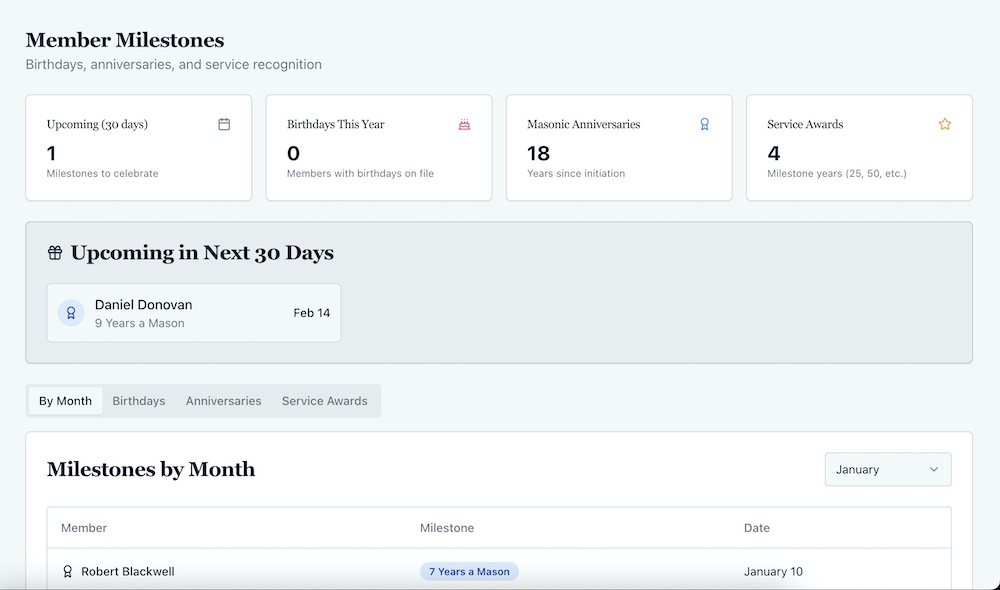
What meetings are coming up? Any correspondence I need to follow up on? Any candidates I should check on? Any dues coming due? Any birthdays or anniversaries this week?
This isn’t about doing everything. It’s about knowing what’s coming so you’re not surprised.
The lodges that run smoothly have Secretaries who stay ahead instead of catching up.
Not because they’re superhuman. Because they have systems that make staying ahead possible.
When Everything Lives in One Place
Look, I resisted centralized systems for a long time. I had my spreadsheets. I knew where things were. I could find stuff.
But “I can find stuff” isn’t the same as organized. And it definitely doesn’t help the next Secretary.
When I moved everything to Masonic Lodge Secretary, the immediate benefit wasn’t features. It was consolidation.
Member records, meeting history, dues tracking, candidate progress, all in one place. One login. One system.
When the Worshipful Master asks a question, I don’t check five places. I check one. When I need to update something, it’s updated everywhere because there is no “everywhere.”
The Junior Warden can see the same information I see. The Treasurer can check dues without asking me. The Senior Deacon can track candidates without calling.
That’s not about software. That’s about treating information like it belongs to the lodge, not the Secretary.
The Transition That Actually Works
You know what the previous Secretary gave me? A file box and good luck.
I spent three months reconstructing information that should have been waiting for me. Member records with gaps. Meeting history I had to piece together. Dues tracking that didn’t match the Treasurer’s records.
It wasn’t malicious. He just never built anything that could outlast him.
Here’s what should happen..
The new Secretary logs in and sees everything the old Secretary saw. Member records complete. Meeting history searchable. Dues status current. Candidate progress tracked.
No file box. No learning curve. Just continuity.
That’s what organization actually means. Not personal efficiency, but institutional continuity.
Your system should survive you stepping down. The next guy should inherit organization, not chaos.
What Good Organization Feels Like
You’ll know your system works when these things are true:
You can answer questions in seconds instead of minutes. Finding information doesn’t require detective work.
Other officers can see what they need without asking you. You’re not a bottleneck.
Officer transitions don’t lose information. The next Secretary starts where you left off.
You spend time on meaningful work instead of hunting for data. Administrative overhead becomes background noise instead of your entire job.
That’s not about working harder. It’s about having systems that work.
Start With One Thing
You don’t need to organize everything at once. Pick the one thing that causes the most pain.
Is it member records? Start there. Build one complete, current roster. Make it searchable. Keep it updated.
Is it meeting minutes? Start there. Get them all in one searchable place. Link attendance. Make them useful.
Is it dues tracking? Start there. One clear record per member. Status visible. Payments easy to record.
Pick one. Get it right. Then build from there.
Organization isn’t a project you complete. It’s a system you maintain. Start small. Stay consistent.
Your future self will thank you. More importantly, the next Secretary will too.
Because the greatest gift you can give your successor isn’t a filing cabinet full of papers. It’s a system that actually works.
TrestleLog: Finally, a proper way to log your Masonic journey. Track every meeting, degree and milestone in one place.
Great Masonic Library: Unlock 300+ rare and out-of-print Masonic books that most Masons will never get to read.
MasonicMentor.AI: Get instant answers to your Masonic questions, any time. Like having a wise mentor available 24/7.
Masonic Courses: Go deeper than your Lodge can take you. In-depth courses on history, ritual and philosophy at your own pace.
FreemasonryAI: Save hours every month with 150+ AI prompts built specifically for Lodge officers and Masonic education nights.
Masonic Etiquette: Know exactly how to conduct yourself in Lodge. The guide every Mason wishes they had from day one.
Masonic Lessons: The lessons behind the ritual, explained clearly. Deepen your understanding at every degree.
Lodgeman Bundle: Everything a dedicated Mason needs in one bundle. The best value way to invest in your Masonic education.
Masonic Lectures: Classic lectures that have shaped Freemasonry for generations, ready for you to study and deliver.
The Masonic Way: Freemasonry is more than a meeting. Discover how to live its principles every single day.
100 Facts About Freemasonry: Surprising, fascinating and little-known facts about the Craft. Perfect for Masons and curious minds alike.
Become a Freemason: Thinking about joining? This guide walks you through everything you need to know before you knock on the door.